Respecting boundaries (part 2)
I recently set about implementing moving platforms in my sandbox game. ULTRA240 strives to be a bare minimum game engine, so things like physics, dynamic boundaries, even the game loop itself, are all up to the game developer to implement. In this case, I needed to create a platform entity that defines its own boundary-type collision box which my sandbox game loop adds to the collection of boundaries before running the collision detection process. But before all that, I need to support one-way boundaries.
In platformers, a one-way boundary is a type of boundary that only detects collision when an entity attempts to travel through it in one direction but not the other. It is most often used to add raised platforms that the player can jump onto. The player is able to jump onto the raised platform from beneath it and not hit their head on the way up, instead landing on the platform on the way down from their jump height.
As it turns out, ULTRA240 already supported one-way boundaries. In fact, ULTRA240 only supports one-way boundaries! This is because, in the context of a traditional platformer at least, one-way boundaries are practically and conceptually much more convenient than “hard” boundaries.
Suppose you’re a character in a game. You’re going to be surrounded by boundaries keeping you in the area of play. These boundaries all connect forming a polygon that you reside in. You would only ever collide with these boundaries on one of their respective sides, the sides you can see all around you, and never the far sides. The game can then practically ignore collision detection on those opposing sides. But how does ULTRA240 know which side to detect collision on?
In early 3D game programming, before 3D graphic accelerators were common place, drawing polygons was an expensive operation. One way to mitigate this cost, was to reduce the number of polygons you had to draw. For instance, you only need to render the faces of objects that are visible. All the polygons on the far side of an object need not be rendered because they cannot be seen behind the polygons of the near side of an object.
The conventional trick used to cull polygons is really cool. First, you compute the normal of the polygon in 3D space. The normal can be thought of as a vector that is perpendicular to the polygon. The normal of a piece of paper laying on your dest is a line pointing straight up to the ceiling. Now that you have the normal, you compute the dot product of it and the camera. The dot product is an endlessly useful value that gives you the relation between two vectors. In this case, we use it to find a how the vectors are oriented relative to each other. When the dot product is positive, it means the vectors are facing each other. When the dot product is negative, it means vectors are facing away from each other.
That’s all you need, isn’t it? Well, not so fast. It turns out that a polygon actually has two normals. That piece of paper on your desk also has a normal that points to the floor after all. How do we find the normal of the “face up” side of the paper, the side that we can see? To get there, we first need to go back to how we computed the normal.
A polygon’s normal is found by taking the cross product of two of its sides. This can be easily visualized using the right-hand rule. Hold out your right hand and point with your index finger in the direction of one vector. Stick out your middle finger in the direction of the other vector. Now, stick your thumb out and whatever direction it points in is the cross product of your index finger and middle finger vectors.
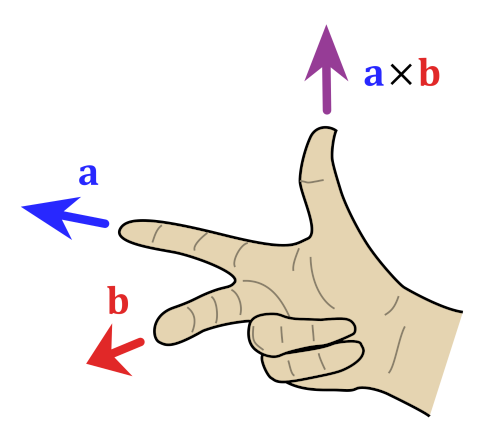
Applying this to your piece of paper, your index finger might point parallel to its long side and your middle finger parallel to its short side. But equally important to these directions is the point of origin. If your knuckles represent the right corner of the paper nearest you, then the normal points to the ceiling. Flip your hand around so that your knuckles represent the right corner farthest from you, and the normal points to the floor. Your middle finger points in the same direction, however, your index finger now points back at you.
To use this property to their advantage, developers established a convention. Points representing a polygon are specifically ordered so that their normal points towards to the camera when the polygon is facing the camera. To produce these results, points are usually ordered clockwise when the polygon is facing the camera.
Since dot products also work in two dimensions, we can use the same trick for our collision detection algorithm. First, we establish a convention of point ordering for the points comprising our boundaries. Let’s say that clockwise points are in bounds. Next, we take the dot product of the boundary “normal” (perpendicular line) and entity movement vector. If the dot product is negative (facing in different directions) we can ignore the boundary. If the dot product is positive (facing in the same direction) we should check for collision between the entity and the boundary. Now when boundaries are closed, meaning that all points are ordered clockwise and chained together forming a polygon, there is no chance of escape for entities residing inside. However, when boundaries are open, meaning the first and last points do not connect, entities are able to pass through the boundary when traveling in the direction facing away boundary’s normal.
Therefore, all boundaries in ULTRA240 are one-way, it’s just a matter of orientation that keeps entities in bounds. Here’s a video demonstrating the use of moving platforms and a vertical one-way boundary at the end. Moving platforms are implemented as one-way boundaries, allowing the player to jump through the bottom of the platform and land on top of it.
Development of ULTRA240 has gotten to a pretty good state, aside from the fact that there is absolutely no sound system at the moment. I previously attempted to introduce more movement options to my sandbox game only to discover bugs in the animation system which took some real thinking to resolve. I might return to my prior effort, but I think I’m leaning towards adding more features to ULTRA240 itself.
If you’ve made it this far, you might as well join the ULTRA240 discord server where I occasionally put development details and updates.